
Restoration Management Software: Complete Guide to Building Your Digital Operations Center
Understanding Restoration Management Software
Restoration management software has become the backbone of modern restoration companies. Whether you're managing small residential projects or large-scale commercial water damage restoration, the right software platform can transform how your team operates, communicates, and delivers results. This comprehensive guide explores what restoration management software is, why it matters, and how to choose the right solution for your business.
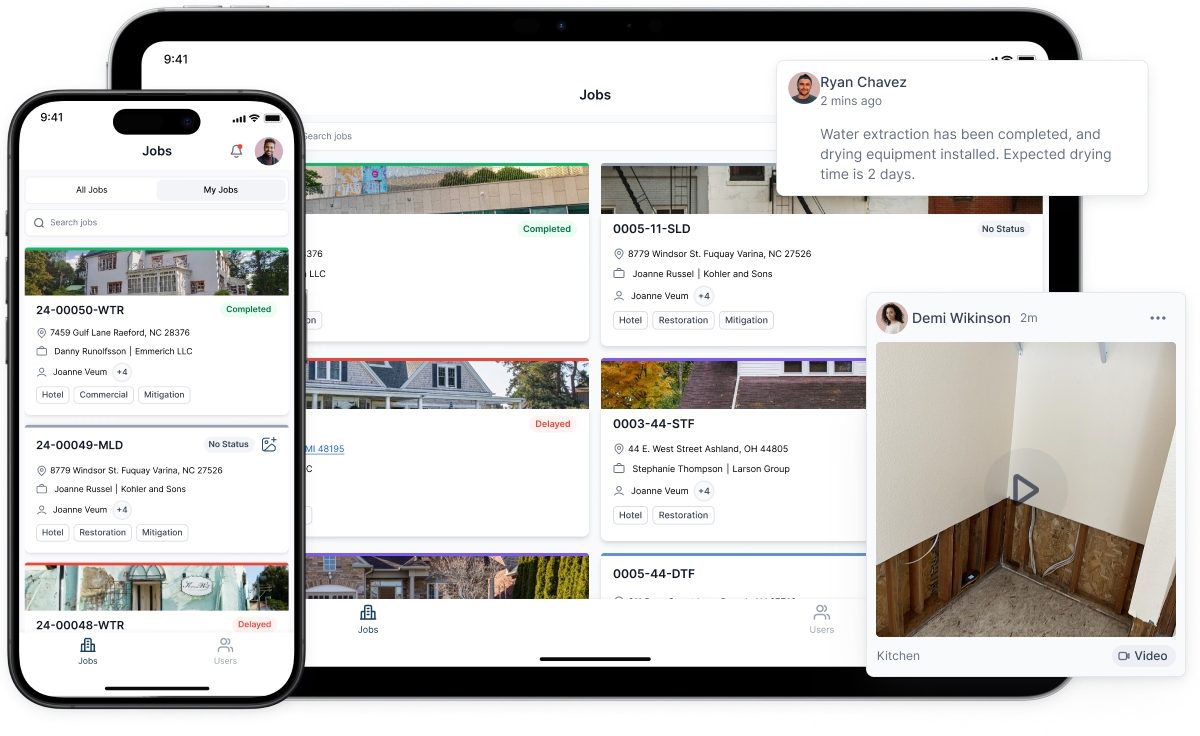
At its core, restoration management software is a digital hub that centralizes all aspects of your restoration business. It combines project management, customer relationship management, invoicing, scheduling, and reporting into one unified platform. For restoration companies, this integration is critical because projects are complex, time-sensitive, and require coordination across multiple team members and departments.
The Role of CRM for Restoration Companies
A CRM for restoration companies is more than just a contact database. It's a strategic tool that helps you build lasting customer relationships while managing the unique demands of restoration work. When a customer experiences water damage or other property damage, they're stressed and need quick, professional responses. A dedicated CRM for restoration companies ensures that no lead falls through the cracks and that every customer interaction is tracked and optimized.
With a restoration CRM, you can:
- Capture and organize customer information from first contact through project completion and beyond - Track all communications, from initial inquiry to final follow-up - Monitor customer satisfaction and build loyalty through targeted follow-up campaigns - Generate repeat business by identifying past customers who may need additional services - Streamline the handoff between sales and operations teams
The restoration CRM feature is particularly valuable because restoration work often leads to repeat business. A customer who experiences water damage today may need mold remediation next month or fire restoration in the future. By maintaining detailed records in your restoration CRM, you ensure your team can provide personalized service and identify upselling opportunities that benefit both your business and your customers.
Digitizing Water Damage Logs for Better Documentation
One of the most critical aspects of restoration management is documentation. Water damage logs are essential for tracking moisture levels, drying progress, equipment placement, and work performed on site. Historically, these logs were written by hand, making them difficult to read, easy to lose, and hard to reference later.
Modern restoration management software digitizes water damage logs, creating a permanent, accessible record of every phase of the restoration process. Digital water damage logs offer numerous advantages:
- Real-time data entry from the job site using mobile apps - Automatic timestamps and location tracking - Searchable records for compliance and insurance purposes - Easy integration with photos and sensor readings - Historical data that helps you improve future projects
Water damage logs created through your restoration management software become part of your project record and can be instantly accessed by authorized team members. This is invaluable when an inspector needs to verify your work or when you need to defend your scope and timeline to an insurance adjuster.
Mastering the Restoration Scope
The restoration scope is arguably the most important element of any restoration project. It defines what work will be performed, which areas are affected, what materials will be used, and what the customer can expect. Getting the restoration scope right determines your profitability, customer satisfaction, and liability protection.
Professional restoration management software helps you capture a complete restoration scope through features like:
- Detailed damage assessment templates that guide technicians through comprehensive site inspections - Photo documentation that visually records the extent of damage - Room-by-room breakdown of affected areas with specific damage descriptions - Line-item lists of restoration work, from mitigation to reconstruction - Integration with third-party estimation tools for consistent scoping
When your restoration scope is clearly documented in your management software, there's no ambiguity about what's included in the project. This protects both your business and your customers, reducing disputes and ensuring efficient project execution.
Remote Xactimate Estimate Capabilities
For many restoration companies, Xactimate is the industry standard for creating detailed estimates. A remote Xactimate estimate allows your team to prepare comprehensive, professional estimates without requiring the estimator to be physically present on site. This capability has revolutionized how restoration companies operate, especially in emergency situations or when coordinating across multiple locations.
When integrated into your restoration management software, remote Xactimate estimate features enable you to:
- Prepare detailed estimates from photos and site measurements provided by field teams - Reduce the time between damage assessment and estimate delivery - Ensure consistency in how damages are estimated and documented - Make adjustments remotely without requiring additional site visits - Integrate estimates directly into your project management system
A well-integrated remote Xactimate estimate workflow means your customers get professional, accurate estimates faster, which improves their satisfaction and speeds up the approval process for insurance claims.
Key Features of Comprehensive Restoration Software
The best restoration management software platforms include several interconnected features that work together seamlessly:
Mobile Project Management: Field teams need access to project details, checklists, and documentation while on site. Mobile-enabled restoration software ensures that technicians can view their assignments, update project status, record water damage logs, and capture photos without returning to the office.
Scheduling and Resource Allocation: With multiple projects happening simultaneously, efficient scheduling is critical. Your restoration software should allow dispatch managers to assign crews, track equipment, and optimize routes to maximize productivity.
Automated Workflows: From initial lead capture through invoice generation, automation reduces manual data entry errors and accelerates your operational timeline. Workflows should be customizable to match your company's specific processes.
Insurance Integration: Many restoration jobs are insurance-funded. Your software should integrate with insurance claim management, automatically populate claim information, and facilitate communication with adjusters.
Financial Management: Track labor costs, material expenses, equipment rental, and other project costs in real time. Compare actual costs to estimates to improve future bidding accuracy.
Reporting and Analytics: Generate reports on project profitability, team performance, customer satisfaction, and business trends. Data-driven insights help you make better decisions and identify improvement opportunities.
Choosing the Right Restoration Management Software
Not all restoration management software solutions are created equal. When evaluating options, consider:
Industry-Specific Design: Look for software built specifically for restoration companies, not generic project management tools adapted for the industry. The best restoration software understands the unique workflows, terminology, and requirements of the business.
Scalability: Your software should grow with your business. Whether you currently manage 5 projects or 50, ensure the platform can handle your anticipated growth without major restructuring.
Integration Capabilities: Your restoration management software should integrate with tools you already use, from accounting software to Xactimate to insurance claim platforms.
User Training and Support: Even the best software is only effective if your team uses it correctly. Look for vendors that provide comprehensive training, documentation, and responsive customer support.
Mobile Accessibility: In restoration work, your team spends most of their time on job sites, not in the office. Ensure the software has robust mobile apps that function reliably in the field.
The Business Impact of Restoration Management Software
Implementing a proper restoration management software system delivers tangible business benefits:
Increased Efficiency: Automation reduces time spent on administrative tasks, allowing your team to focus on actual restoration work.
Improved Accuracy: Digital documentation and integration tools reduce errors in estimation, scoping, and invoicing.
Better Customer Experience: Faster estimates, transparent communication, and professional documentation create positive customer experiences that lead to referrals and repeat business.
Enhanced Profitability: Accurate scoping, cost tracking, and data-driven decisions help you maximize profit margins on every project.
Regulatory Compliance: Comprehensive documentation and audit trails help you comply with industry standards and insurance requirements.
Team Accountability: Clear assignment tracking, time logging, and performance metrics create transparency and accountability across your organization.
Moving Forward with Restoration Management Software
The restoration industry has evolved dramatically over the past decade. Companies that embrace modern restoration management software gain competitive advantages in how quickly they respond to customers, how accurately they estimate work, and how efficiently they deliver results. Whether you're a small, family-owned restoration company or a multi-location enterprise, investing in the right restoration management software is an investment in your business's future.
The combination of a comprehensive CRM for restoration companies, mobile-enabled project management, integrated water damage logs, streamlined remote Xactimate estimate capabilities, and detailed restoration scope documentation creates a powerful system that positions your business for growth and success in an increasingly competitive market.


