
Restoration Management Software: Features That Cut Cycle Time and Protect Your Margins
The Metric That Separates Profitable Restoration Companies from Busy Ones
Most restoration contractors measure revenue. The ones consistently clearing 15–20% net margins measure cycle time — the number of days from first notice of loss to final invoice paid. Every extra day a job sits open ties up labor, equipment, and cash. Restoration management software exists to compress that number. But the category is crowded, the demos all look similar, and the wrong choice costs more than the subscription fee.
This article gives you a framework for evaluating what you actually need, based on where cycle time bleeds out in a typical mid-size restoration operation.
Where Jobs Actually Slow Down
Before buying software, map the friction. In most companies running 40–150 jobs per month, the same four bottlenecks appear:
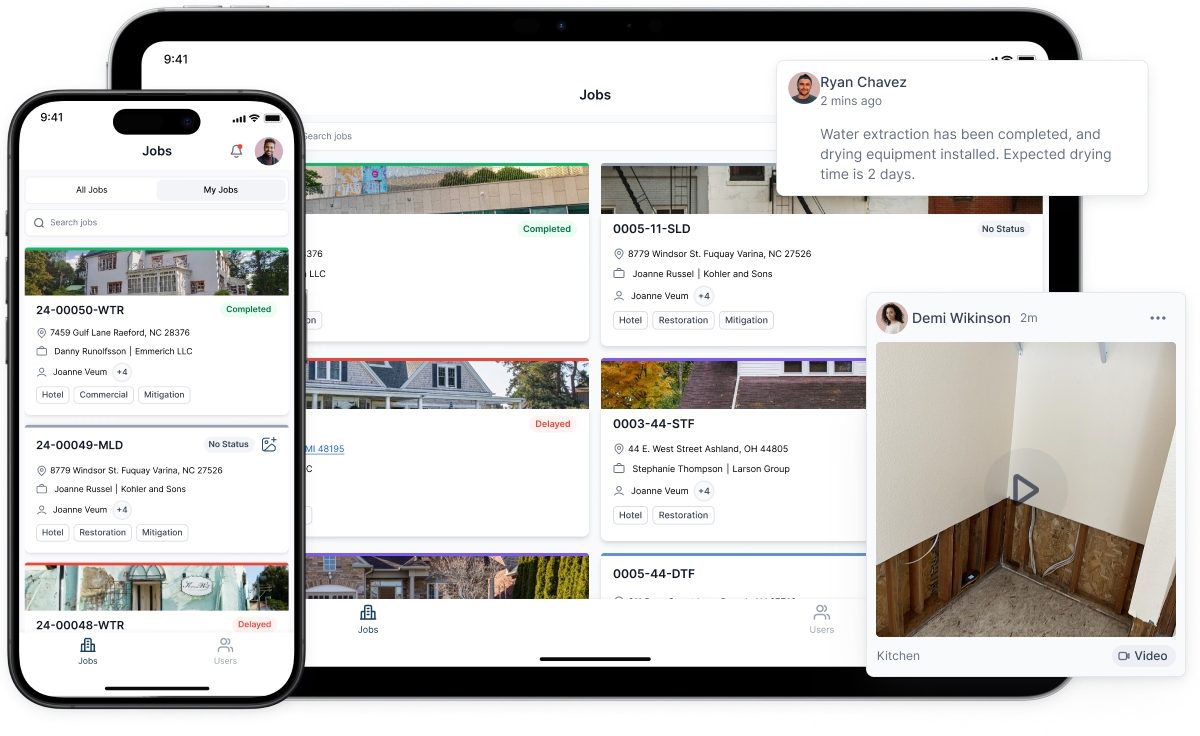
- Documentation lag. Technicians capture moisture readings, photos, and equipment placement on paper or personal phones. That data reaches the office — if it reaches the office — hours or days later. Water damage logs that aren't timestamped and centralized are nearly impossible to defend in a supplement dispute.
- Estimate turnaround. A project manager drives back to the office, opens Xactimate, builds the scope, and emails it to the adjuster. That round trip routinely adds 24–48 hours per job. A remote Xactimate estimate workflow, where a field tech captures measurements and conditions in real time and a dedicated estimator scopes from the office simultaneously, can cut that to under four hours.
- Handoff failures. Sales closes a job, but production doesn't get a complete file. The crew shows up without the correct equipment list, the customer's preferred contact window, or the adjuster's claim number. These failures are almost always a communication system problem, not a people problem.
- Follow-up gaps. Leads that don't convert immediately get forgotten. Existing customers who had a good experience never get a referral ask. Both represent revenue already paid for by your marketing spend, left on the table.
Good restoration project management software addresses all four. Mediocre software addresses one or two and calls the others "integrations."
What a Restoration CRM Actually Does (and What It Doesn't)
A general-purpose CRM — Salesforce, HubSpot, even a well-configured spreadsheet — can track contacts and log calls. What it cannot do is connect a lead source to a job file, auto-populate an assignment order with moisture readings, or flag a job that has gone 72 hours without a drying log entry.
A purpose-built restoration CRM is designed around the claim lifecycle, not the sales pipeline. The distinction matters because restoration revenue doesn't behave like SaaS revenue. A job isn't "closed" when the contract is signed; it's closed when the certificate of completion is signed and the carrier pays. Everything in between — mitigation, reconstruction, supplements, final billing — requires a system that understands that sequence.
Practically, crm for restoration companies should do these things out of the box:
- Attach a claim number, adjuster contact, and policy limit to every job record from day one
- Track communication history with both the property owner and the carrier in a single thread
- Generate automated follow-up tasks when a job hits a defined milestone (for example, "scope submitted — follow up with adjuster in 3 business days if no response")
- Surface jobs that are aging past your target cycle time so a manager can intervene before a small delay becomes a 30-day problem
If the CRM you're evaluating requires a developer to configure those workflows, keep looking.
Water Damage Logs: The Documentation Detail That Decides Supplement Battles
Adjusters approve supplements when the documentation leaves no room for argument. Psychrometric data — daily temperature, relative humidity, GPP, and equipment readings — entered in real time is far harder to dispute than a summary typed from memory three days after mitigation ended.
Modern restoration management platforms generate water damage logs automatically when field techs enter readings through a mobile app. The log timestamps each entry, ties it to a specific room and piece of equipment, and exports directly into a format carriers accept. Some platforms cross-reference the readings against the IICRC S500 drying standard and flag anomalies — a room that isn't trending toward dry after 48 hours, for instance — so the project manager can adjust the equipment set before the adjuster asks why drying took nine days instead of five.
That last feature is worth pricing separately. A single supplement defended successfully can cover months of software cost.
Remote Xactimate Estimates: The Workflow Change Most Companies Overlook
Xactimate is the industry standard for a reason: carriers trust the pricing database and the line-item format. The problem isn't the tool; it's the workflow built around it.
The traditional model has one person doing everything — inspect, measure, scope, write, submit. That person is usually your most experienced project manager, whose time costs the most and whose presence on-site produces the most value. Pulling them off the floor to write estimates is an expensive habit.
A remote Xactimate estimate model separates the inspection from the writing. The field tech uses a sketching tool (Matterport, Magicplan, or even Xactimate's own mobile sketch) to capture dimensions and conditions. That data syncs to the estimating platform, where a dedicated estimator — who may never visit the property — builds the scope. The project manager reviews and approves. Total elapsed time drops, error rates drop, and your best field people stay in the field.
This workflow requires your restoration project management software to support real-time data sync between the field app and the estimating environment. Not every platform does. Ask specifically: "Can a field tech's measurements populate an Xactimate sketch without manual re-entry?" If the answer involves exporting a CSV, the workflow won't hold at volume.
Restoration Marketing Software: Stop Treating It as a Separate Category
Marketing and operations should share data. They rarely do, which is why most restoration companies can't answer a simple question: which referral source produces jobs with the best margins, not just the most volume?
A plumber who sends you three jobs a month at an average job size of $4,200 and a 22% margin is worth more than an insurance agent who sends six jobs at $2,800 and a 14% margin. You can only see that if your restoration marketing software is connected to your job costing data, not running in a separate silo.
Platforms that combine CRM, project management, and marketing automation let you tag every lead with a source, track that source through to final invoice, and calculate true return on each referral relationship. That data changes how you allocate your business development time. Instead of taking every lunch meeting that comes up, you schedule around the relationships that actually produce profitable work.
Automated touchpoints matter here too. A system that sends a thank-you message to a referring plumber when their referral's job closes, then flags that plumber for a personal call at the 90-day mark, keeps relationships warm without requiring a salesperson to remember every contact manually.
Evaluating Platforms: Five Questions Worth Asking Before a Demo
Demos are designed to show you what works. These questions surface what doesn't.
- What does the mobile app work like with no cell signal? Many loss sites — basements, rural properties, commercial buildings with thick walls — have poor connectivity. If the app requires a live connection to save data, your techs will revert to paper.
- How does the platform handle a job that spans mitigation and reconstruction? Some systems treat these as separate jobs. That creates duplicate data entry and breaks the documentation chain adjusters want to see.
- What's the actual implementation timeline for a company our size? "A few weeks" usually means six to ten weeks when you account for data migration, staff training, and workflow configuration. Get a written project plan.
- Can we export our data in a standard format if we leave? Vendors who hesitate on this question are telling you something.
- What does your support look like on a Saturday at 7 a.m.? Losses don't happen on business days. If support is email-only outside of 9–5, that's a real operational constraint.
The Honest Cost-Benefit Calculation
Enterprise restoration platforms run $300–$800 per month for a team of 10–15 users. Mid-market options sit in the $150–$350 range. That's $1,800–$9,600 per year — real money, but modest against the cost of a single disputed supplement that doesn't get paid, or a lead pipeline that leaks 30% of its contacts because there's no follow-up system.
The cleaner way to frame the ROI: pick one bottleneck the software directly addresses, estimate the dollar value of closing it, and compare that to annual cost. If better water damage logs help you win two additional supplements per month at $800 each, that's $19,200 per year recovered. The software pays for itself before you count the time savings.
Start there. Choose a platform that solves your most expensive problem first, integrates cleanly with Xactimate, and has a support model that matches how your business actually operates. Add features as your team grows into them. The companies that get the most from this software aren't the ones who bought the most features — they're the ones who actually changed their workflows.


