
Restoration Management Software: Which Features Actually Cut Cycle Time
The Metric Most Restoration Owners Ignore Until It Costs Them a Job
Cycle time — the number of days from first notice of loss to final invoice — is the single number that predicts whether an insurance adjuster calls you again. The average residential water loss closes in 21 days for the top quartile of restoration contractors and 47 days for the bottom. That gap is not a talent gap. It is almost entirely a coordination gap, and restoration project management software is what closes it.
Most operators already know they need software. The harder question is which capabilities actually move that number and which ones are expensive features that look good in a demo. This article answers that question directly, with enough specificity to make a real purchasing decision.
Where Jobs Actually Stall
Before evaluating any platform, map where your hours go. In a typical mid-size restoration company handling 15 to 40 jobs per month, time bleeds in three places:
- Estimate handoff. A tech documents moisture readings and photos on-site, then a project manager or estimator recreates the scope from scratch back at the office. The duplication alone adds two to four days to cycle time.
- Adjuster communication. Phone tag and email chains to approve a scope or supplement a line item. Without a documented thread, the same conversation happens three times.
- Subcontractor scheduling. Rebuild crews sit idle because nobody confirmed material delivery. The job sits at 80% complete for a week.
Software that solves these three problems earns its cost. Software that solves only one of them while adding complexity to the other two does not, regardless of price.
What a Real Restoration Project Management Platform Does
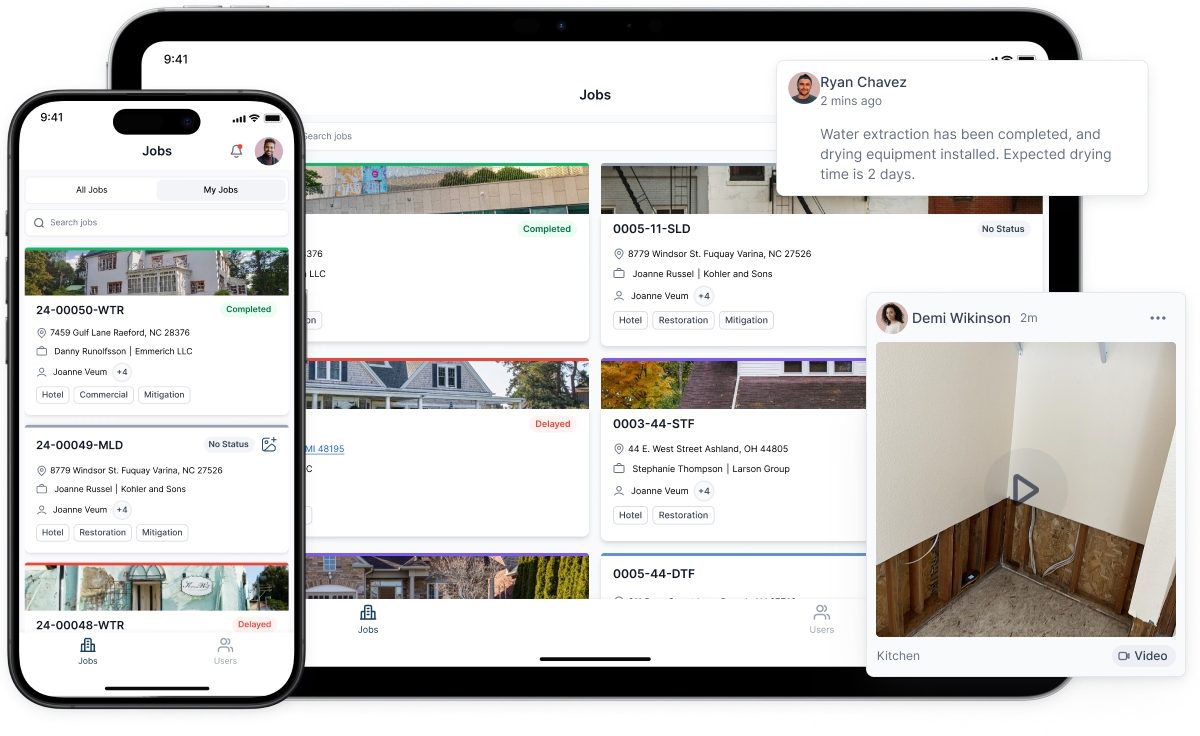
The core function is a single job record that every stakeholder — tech, estimator, project manager, subcontractor, adjuster, and homeowner — reads from and writes to in real time. That sounds simple. Most companies are not doing it. They are running jobs across a whiteboard, a spreadsheet, a texting thread, and a folder of PDFs that nobody has named consistently.
Platforms like Dash, Jonas, and Encircle are built specifically for the restoration workflow. They connect field documentation (photos, moisture logs, equipment placement) directly to the job record, so the estimator is not starting from a verbal description. That connection alone typically cuts the estimate-drafting phase by a full day.
The job record also becomes the communication spine. When an adjuster asks why a line item is in the scope, the project manager pulls up the photo, the moisture reading, and the IICRC S500 reference that supports it — in under two minutes, from the same screen. Compare that to digging through a shared Google Drive folder where photos are named IMG_4471.jpg.
CRM for Restoration Companies: More Than a Contact List
A CRM built for general businesses tracks leads and deals. A CRM for restoration companies needs to track relationships with insurance adjusters, property managers, plumbers, and real estate agents — all of whom refer work on a timeline that has nothing to do with a standard sales funnel.
A plumber who refers two jobs a month is worth roughly $18,000 to $24,000 in annual revenue at average ticket sizes. A CRM for restoration companies should flag when that plumber hasn't sent a referral in six weeks so a business development rep can schedule a lunch — not because a deal is "closing" but because the relationship needs maintenance. Generic CRMs don't model that. Restoration-specific CRMs do, because they are built around referral source tracking rather than pipeline stages.
Restoration marketing software extends this by automating touchpoints: a thank-you text to a homeowner after job completion, a quarterly check-in email to an adjuster, a birthday note to a property manager. None of these take long to send. The problem is remembering to send them across 300 contacts while also running active jobs. Automation handles the memory so your team handles the relationship.
Xactimate Estimates: The Integration That Changes Everything
Xactimate is the pricing language of property insurance claims. If your estimate is not in Xactimate format, many adjusters will not approve it without a manual conversion that delays payment by days or weeks. Getting fluent in Xactimate — and building a workflow around it — is not optional for any company doing meaningful insurance work.
The practical challenge is that writing a precise Xactimate estimate requires a complete, documented restoration scope. A scope built from memory or incomplete field notes produces estimates that get supplemented, disputed, or rejected. The fix is ensuring that field documentation feeds directly into the scope before the estimate is written — which is exactly what integrated restoration project management software enables.
A concrete example: a tech documents 14 affected materials across three rooms using an app like Encircle or Hover. That documentation exports a structured line-item list that an estimator imports into Xactimate rather than typing from scratch. Errors drop. Time drops. The estimate that would have taken three hours takes 45 minutes and is more defensible because every line ties back to a photo or reading.
Remote Xactimate Estimates: What They Actually Require
The rise of remote xactimate estimate services — where an estimator writes the scope from photos and documentation without visiting the site — has created both an opportunity and a risk. The opportunity: faster turnaround, lower cost per estimate, and the ability to handle volume spikes without hiring. A company doing 20 jobs a month might outsource estimates during a CAT event when volume triples overnight.
The risk: a remote estimate is only as good as the documentation it is built from. If the field tech photographs the visible damage but misses the wet wall cavity behind the cabinet, the remote estimator cannot know what they cannot see. That gap produces an incomplete scope, an underpaid claim, and a supplement battle that costs more time than writing the estimate correctly the first time.
The companies that use remote estimating successfully have standardized their field documentation protocols — specific photo angles, moisture map requirements, equipment logs — so that any estimator, local or remote, has what they need to write a complete scope. That standardization lives in the field documentation module of the project management platform. Without it, remote estimating is a cost-saving measure that creates a quality problem.
Choosing Software: The Four Questions That Actually Matter
Vendor demos are designed to show you the best case. Here are the questions that reveal the real case:
- How does a field tech document a loss on a phone with no cell signal? If the answer involves waiting for connectivity to sync, jobs in rural areas or basements will create gaps. Look for true offline-first architecture.
- How does the system handle a supplement? Walk through the exact steps from identifying a missed line item to getting adjuster approval. Count the clicks and the handoffs. If it takes more than three steps, your project managers will find a workaround — usually email.
- What does the Xactimate integration actually do? Some platforms claim integration but mean they can export a PDF. Real integration pushes structured data into Xactimate line items. Ask for a live demonstration of a real job, not a sample.
- How long does onboarding take, and what is the dropout rate? Software that your team stops using after 60 days costs more than no software. Ask the vendor for the average time-to-full-adoption and for references from companies your size.
What Implementation Actually Looks Like
The companies that get value from restoration management software in the first 90 days share one practice: they pick one workflow to fix first and they fix it completely before adding complexity. Typically that is field documentation — standardizing how techs capture a loss so that every job record is complete from day one.
Once field documentation is consistent, the estimate workflow improves almost automatically because the inputs are reliable. Once estimates are reliable, adjuster relationships improve because supplements drop. Once supplements drop, cycle time drops. The gains compound, but only if the foundation — clean field data — is in place.
Companies that try to implement every feature at once usually end up with a system that is partially used across every function and fully used in none. Pick the constraint. Fix it. Move to the next one.
The Number to Track After Go-Live
Set a baseline for your current average cycle time before you go live on any new platform. Measure it again at 60 days and 120 days. If cycle time is not moving, the software is not being used correctly — or it is the wrong software. Either way, you have the data to make a decision rather than a guess.
Every day shaved off cycle time on a $15,000 average job is real money: faster cash collection, lower carrying cost, and an adjuster who remembers you as the contractor who closed clean and on time. That reputation is what fills your pipeline without a dollar of paid advertising.


